Plans and billing
The four plans, per-member assignment, and billing cycles
Updated 2026.10.13
This page covers the plan types and how to assign them.
The four plans
| Plan | Positioning |
|---|---|
| Free | Start at no cost |
| Standard | Unlocks automation features |
| Business | More capacity and features |
| Enterprise | Talk to us |
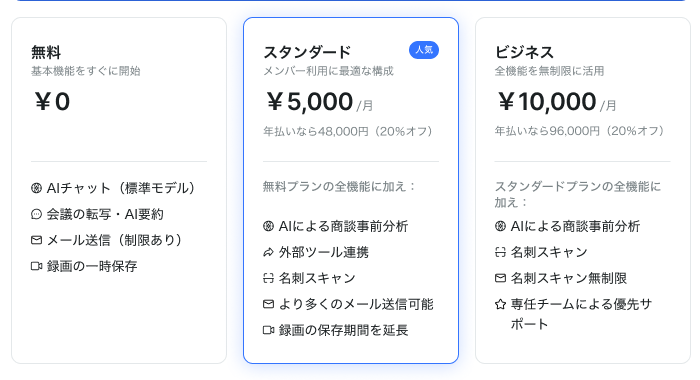
For current pricing and a feature comparison, see the pricing page. The help center does not list prices.
Plans are assigned per member
Plans are assigned per member, not per workspace. Not everyone has to be on the same plan.
- Check who is on which plan under Settings → Plans
- Drag members between plans to move them
- Changes do not take effect until you save
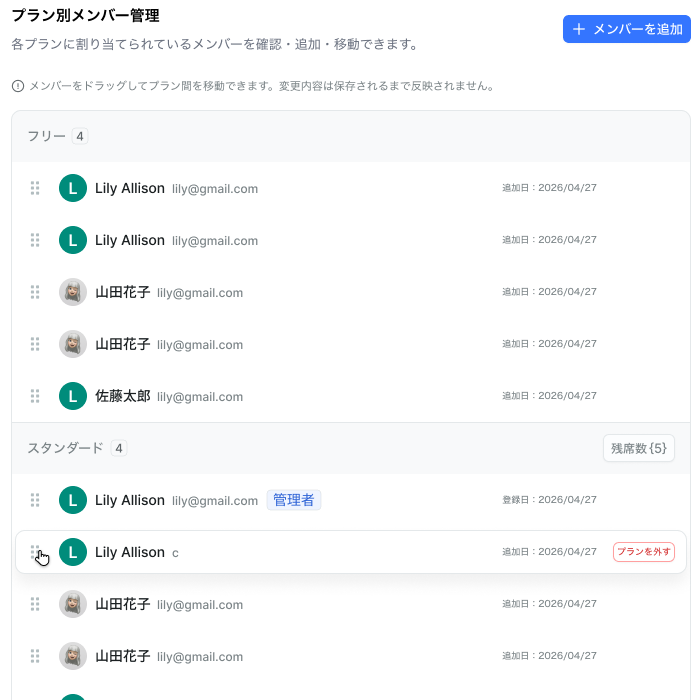
Paid plan headers show the remaining seats. If there are no free seats, you need to add seats before moving someone. Remove from plan on a row returns that member to Free.
A common setup: heavy users on Standard or above, view-mostly members on Free.
Billing cycle
Choose monthly or annual billing. Annual is 20% off.
Prices shown are per user, excluding tax.
What changes with each plan
| Item | Free | Standard | Business | Enterprise |
|---|---|---|---|---|
| Email sending limit (per user per day) | 50 | 200 | 500 | 500 |
| Meeting recording, transcription, AI summaries | ✓ | ✓ | ✓ | ✓ |
| Recording retention | 30 days | 180 days | 365 days | 365 days |
| Pre-meeting analysis reports | — | ✓ | ✓ | ✓ |
| Business card scanning | — | 100 / month | Effectively unlimited | Effectively unlimited |
| Custom properties | — | ✓ | ✓ | ✓ |
| Advanced analytics and dashboards | — | ✓ | ✓ | ✓ |
| Priority support | — | — | ✓ | ✓ |
Through October 31, 2026, the Slack, LINE, and MCP integrations are available regardless of your current plan. Starting in November, availability is planned to follow your plan (we'll share the details before that begins).
Enterprise inherits everything in Business. The limits are the same as Business; anything beyond that is discussed individually.
Recording, transcription, and AI summaries work on the Free plan too. What changes is retention — Free recordings are deleted automatically after 30 days, so consider upgrading if you need recordings to stick around.
See Email sending limits, Slack integration, LINE integration, MCP integration, and Recording meetings.
If you can't make a change
- "No active contract" — a contract needs to be created first. Members should contact an admin
- "Another payment is in progress" — wait a moment and retry