Configuring deal stages
Adding, editing, and reordering stages to match your sales process
Updated 2026.08.13
This page covers shaping your deal stages around your own sales process under Settings → Deal stages.
Two groups: in progress and completed
Stages fall into two groups.
| Group | Contents |
|---|---|
| In progress | Stages where the deal is moving. Freely add, edit, delete |
| Completed | Won and Lost. Reorder only |
Won and Lost are the deal's outcome itself, so their names and meaning can't change. It's the in-progress stages that express your sales process.
The default stages
A new workspace comes with these seven.
| Group | Stages |
|---|---|
| In progress | 初回接触 (First contact) → ヒアリング (Discovery) → 提案 (Proposal) → 検討中 (Under review) → 条件調整 (Negotiation) |
| Completed | 受注 (Won) / 失注 (Lost) |
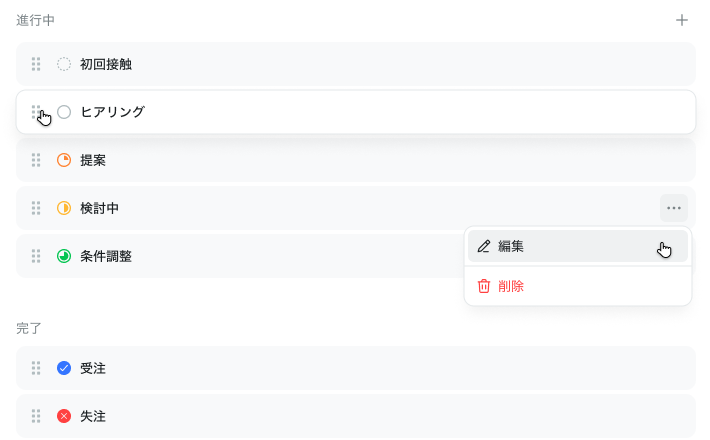
You don't have to keep these stages as they are. The in-progress ones can be added to, edited, reordered, and deleted to fit your process.
Add a stage
Create one from Add stage. In-progress and completed stages are added separately.
| Field | Contents |
|---|---|
| Stage name | e.g. First contact |
| Progress | A number from 0 to 100 |
| Color | Display color in lists |
| Icon | A symbol representing progress |
| Stage type | In progress (automatic) / Won / Lost |
Progress takes a value from 0 to 100. For in-progress stages, the progress icon is chosen automatically from this number. Won and Lost use dedicated icons, so their progress can only be 0 or 100.
Reorder
Stages reorder by drag & drop. Matching the order of your actual sales process keeps the list readable.
Delete a stage
When deleting, you specify where the deals attached to that stage should move. Deleting without picking a destination isn't possible.
This keeps deals from being orphaned — "I removed an unused stage and the deals in it vanished" can't happen.
How to think about your setup
Align stages with the divisions your salespeople actually judge by. Write the idealized process instead, and the team ends up unsure which to pick — and the stages stop being updated.
Migration and review approaches are also covered in the downloadable "SFA / CRM migration checklist".