Configure notifications
App, Email, Slack, and LINE destinations, and per-item delivery settings
Updated 2026.10.13
This page covers deciding where notifications go under Settings → Notifications. For reading the ones that arrive, see Check your notifications.
The four destinations
The settings screen is split into tabs. Each destination is configured independently, so combinations like "get the daily digest in-app but not in Slack" are possible.
| Destination | What it is |
|---|---|
| App | In-app notifications |
| Slack | A Slack channel |
| LINE | LINE messages |
Slack can't be configured until its integration is set up. If not yet linked, the screen shows guidance.
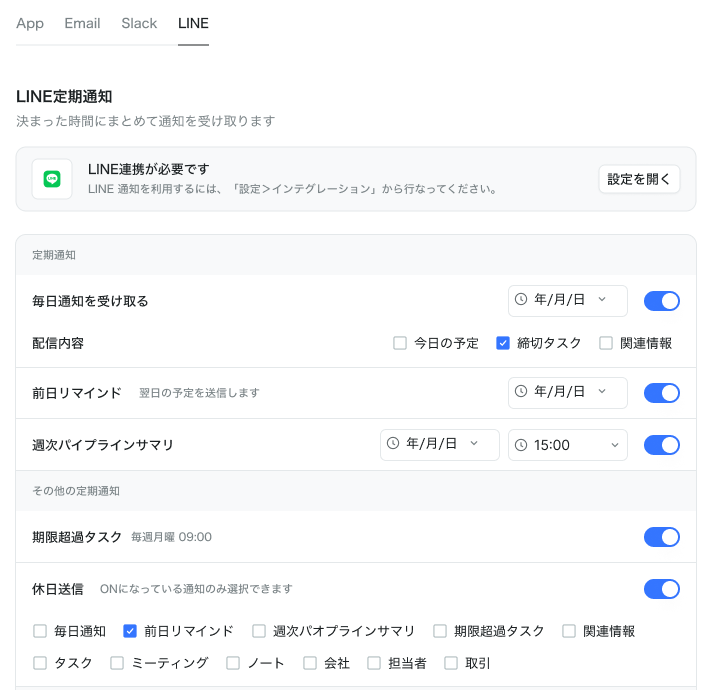
You can configure the LINE tab before linking, but notifications reach LINE only after you've set up the LINE integration. The LINE tab shows a LINE connection required notice with an Open settings button.
Scheduled vs. event notifications
Each tab's settings come in two kinds.
Scheduled notifications — delivered together at a fixed time.
| Item | Contents |
|---|---|
| Daily digest | Pick what to include from today's schedule, due tasks, and related info |
| Day-before reminder | Sends tomorrow's schedule |
| Weekly pipeline summary | A weekly deals roundup; pick the day and time |
| Overdue tasks | A list of tasks past their due date |
Enable holiday delivery to choose, per notification, which ones also send on holidays (only notifications that are ON appear as options).
Event notifications — arrive as things happen. Each item toggles ON / OFF.
| Item | When it notifies |
|---|---|
| Tasks | Assignee changes, status changes, completion |
| Meetings | Reminders, status updates |
| Notes | Created, updated |
| Companies | Created, updated |
| Contacts | Created, updated |
| Deals | Created, updated |
Turning everything on makes for far too many notifications. Start with just tasks and meetings, and add more as needed.
Connect Slack
Connect Slack and activity in your workspace can be sent to Slack. Multiple channels can be chosen as destinations.
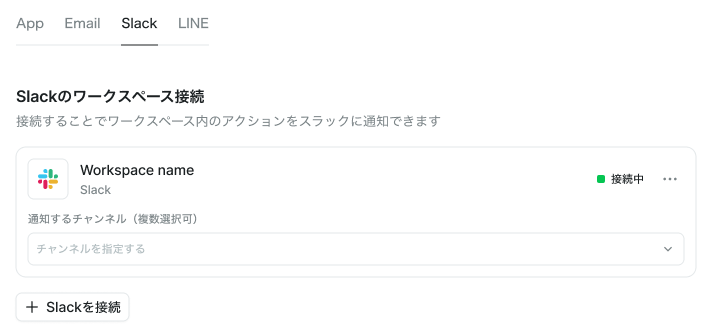
Through October 31, 2026, the Slack integration is available regardless of your current plan. Starting in November, availability is planned to follow your plan (we'll share the details before that begins).
Disconnecting happens on the same screen.