Gauging customer distance with the relationship score
How to read the relationship score and last-contact shown per company and contact
Updated 2026.08.13
This page covers the relationship score shown on companies and contacts.
From your interaction history, it rates on a five-level scale how much of a relationship you've built with the customer — a clue for spotting "customers we haven't touched in a while".
The five levels
| Label | Meaning |
|---|---|
| Very strong | The relationship is well established |
| Strong | A relationship exists |
| Weak | Few touchpoints |
| Very weak | Almost no touchpoints |
| Not yet calculated | Not computed yet |
"Not yet calculated" does not mean the relationship is weak. It means the interaction records needed for scoring don't exist yet — shown when you've only just connected, or when the history isn't in Aitane.
Where it appears
| Place | Shown |
|---|---|
| Company list & detail | Relationship score, last contact |
| Contact list | Relationship score, last contact |
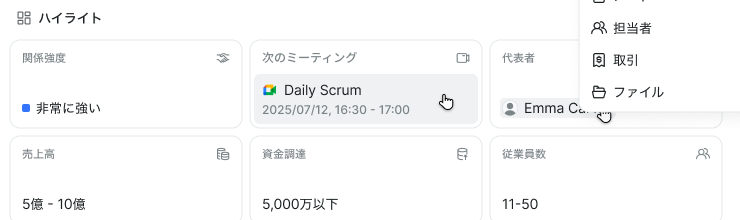
On a company's detail screen, the highlights row lines up the relationship score, next meeting, representative, revenue, headcount, and so on.
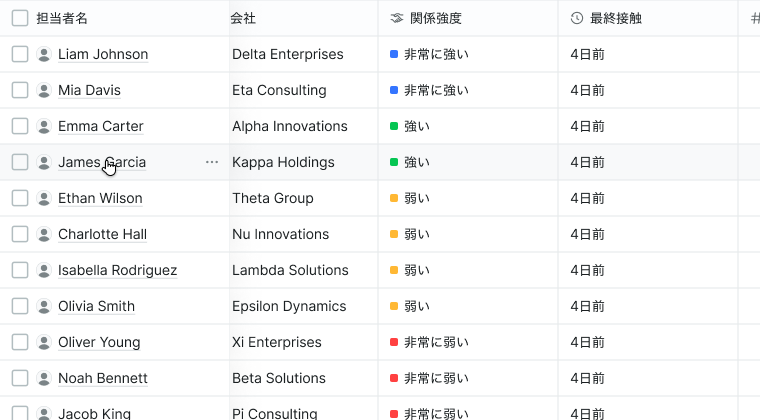
Shown as a list column, it lets you review low-score customers in one sweep. It can be included in CSV exports too.
Ways to use it
- Prevent lost deals — surface customers with an active deal but a weak relationship
- Re-engage — check customers whose last contact was a while ago
- Hand over — attach relationship strength to handover notes when owners change
The score is computed from recorded interactions. Anything that doesn't pass through Aitane (phone calls, in-person-only contact) is not reflected. Don't take the number as ground truth — treat it as one input to your judgment.